
This vulnerability is due to insufficient request validation when using the REST API feature. An attacker could exploit this vulnerability by sending a crafted API request to an affected vManage instance. A successful exploit could allow the attacker to retrieve information from and send information to the configuration of the affected Cisco vManage instance. This vulnerability only affects the REST API and does not affect the web-based management interface or the CLI.
Cisco released software updates that address this vulnerability, according to an advisory. There are no workarounds that address this vulnerability.
See the chart for the vulnerable releases of Cisco SD-WAN vManage software.
Cisco SD-WAN vManage API is a REST API for controlling, configuring, and monitoring the Cisco devices in an overlay network. Use cases for the vManage API include the following:

- Monitoring device status
- Configuring a device, such as attaching a template to a device
- Querying and aggregating device statistics
Users may be able to detect attempts to access the REST API by examining the log file. The REST API log file is at the following path in the vManage filesystem: /var/log/nms/vmanage-server.log.
Administrators can use the CLI command show log, as in the following example, to view the content of the vmanage-server.log file:
vmanage# show log /var/log/nms/vmanage-server.log
If “Request Stored in Map is (/dataservice/client/server) for user (admin)” appears in the log, the REST API has received requests.
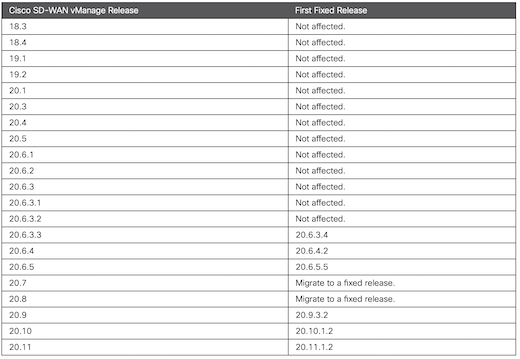
Users can upgrade to an appropriate fixed software release as indicated in the above chart.Source: Cisco
Users must perform their own impact analysis based on the information in the log and any user accounts configured on the vManage.
Keep in mind, though, the presence of requests in this log does not indicate unauthorized access; rather, it only indicates attempts have been made to access the REST API.
Click here for additional product fixes from Cisco.