The vulnerability could allow an unauthenticated attacker to bypass the FortiCloud SSO login authentication via a crafted SAML message, if the user enabled the feature on the device. CVE-2025-59718 and CVE-2025-59719 allow an improper verification of cryptographic signature vulnerability.
However, when an administrator registers the device to FortiCare from the device’s GUI, unless the administrator disables the toggle switch “Allow administrative login using FortiCloud SSO” in the registration page, FortiCloud SSO login ends up enabled upon registration.
If patching is not possible at this time, organizations should follow Fortinet customer guidance for mitigation advice. That procedure involves turning off the FortiCloud login feature (if enabled) temporarily until upgrading to a non-affected version.

To prevent being affected by this vulnerability on vulnerable versions, turn off the FortiCloud login feature (if enabled) temporarily until upgrading to a non-affected version.
To turn off FortiCloud login, go to System -> Settings -> Switch
“Allow administrative login using FortiCloud SSO” to Off.
Or type the following command in the CLI:
config system global
set admin-forticloud-sso-login disable
end
CVE-2025-59718 and CVE-2025-59719 are the case number for the vulnerabilities, which have a CVSS v3 base score of 9.1.
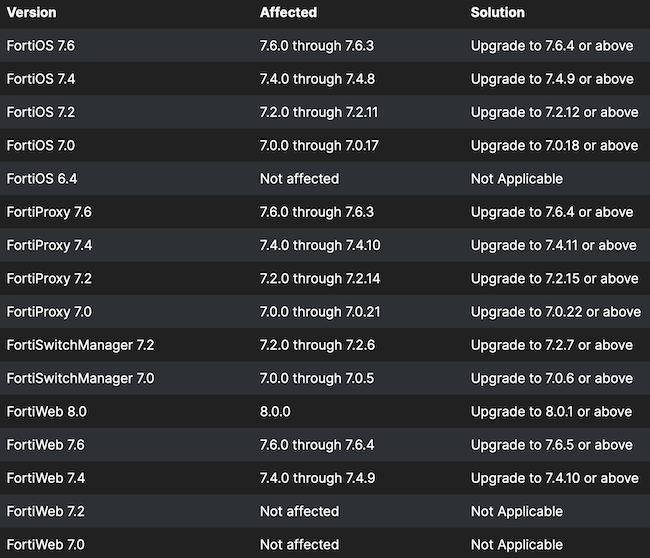
The following graphic provides the versions affected by the vulnerabilities and the fixed versions.